We may earn money or products from the companies mentioned in this post.
Can we talk about January for a minute? It's that time of year when we're all determined to get our lives together, meal prep like champions, and finally figure out where everyone needs to be and when. But between managing our own schedules, kids' activities, work commitments, and trying to remember if we took our evening primrose oil (hello, menopause brain fog!), keeping track of everything can feel completely overwhelming.
I've been there. Standing in the kitchen at 7:45 AM, realizing someone has soccer practice in 15 minutes while another child needs to be picked up from a completely different location at the exact same time. Sound familiar? The mental load of being the family scheduler is exhausting, and those cute paper planners that looked so promising in December are already buried under last week's mail.
That's why I'm obsessed with digital family calendars. These aren't just fancy screens. They're game changers for busy households trying to keep everyone on the same page without the constant “What time is my appointment?” texts or the dreaded realization that you've double booked yourself again.
Why Digital Calendars Are Perfect for Midlife Moms
Let's be honest. Our brains are juggling a lot right now. Between hormonal changes, aging parents, growing kids, careers, and trying to maintain some semblance of self-care, we need all the help we can get. Traditional paper calendars require everyone to actually look at them (which never happens) and keeping everyone's schedule on your phone means you're the sole keeper of all family knowledge. Yep! I am the one sending daily text reminders to my husband and kids!
Digital wall calendars solve this problem beautifully. They're visible to everyone, they sync with the calendars you're already using, and they can send reminders so you're not the only one responsible for remembering everything. Plus, they look sleek and modern. Way better than that cluttered cork board covered in permission slips and appointment cards.
What I Looked For
Here's what mattered most to me:
Easy Syncing – It needs to work with Google Calendar, Apple Calendar, or whatever system your family already uses. Nobody has time to manually input everything twice.
Multiple Users – Everyone in the family should be able to add their own events and see what's happening. Color coding by family members is a huge bonus.
Touchscreen Display – Because we're not going back to tiny buttons and complicated menus.
Clear, Readable Display – It needs to be visible from across the room so you can glance at it while making morning tea (or evening wine, no judgment).
Reliable Performance – It should work consistently without constant troubleshooting. We have enough on our plates without becoming tech support for our calendars.
I'm purchasing all of these through Amazon Prime because the free delivery is fantastic, and if something doesn't work out, the return policy makes it completely stress free.
My Top Pick
Best Overall: Skylight Calendar
The Skylight Calendar is the gold standard for digital family organization. After researching it thoroughly, I can see why it has such a devoted following. This isn't just a calendar. It's a complete family command center.
What Makes It Special:
The Skylight features a gorgeous 15-inch touchscreen display that's large enough to see from anywhere in your kitchen. The interface is incredibly intuitive. If you can use a smartphone, you'll have no trouble with this. What really sets it apart is how beautifully it displays information. You can see your entire week at a glance with color coded events for each family member, and it includes weather forecasts so you know whether to send the kids with jackets.
The syncing capabilities are excellent. It works with Google Calendar, Apple Calendar, Outlook, and Cozi, which means everyone's existing schedules automatically appear. You can also email events directly to your calendar, which is perfect when you receive appointment confirmations or school schedules. The magic lists feature is brilliant too. Create shared grocery lists, to-do lists, or meal plans that everyone can access and update.
Who It's For:
This is perfect for families who want a premium experience and are willing to invest in quality. If you have multiple family members with busy schedules and want something that will genuinely reduce the mental load of managing everyone's time, the Skylight is worth every penny. It's also great if you want to display family photos in a slideshow when the calendar isn't actively being viewed. It's beautiful enough to be a focal point in your kitchen.

The Skylight Calendar is the gold standard for digital family organization. After researching it thoroughly, I can see why it has such a devoted following. This isn't just a calendar. It's a complete family command center.
Best Budget Friendly: 10-Inch Digital Calendar
If you're looking to dip your toes into digital calendar territory without breaking the bank, the YPI calendar is an excellent starting point. Don't let the lower price fool you. This calendar packs impressive features into a more affordable package.
What Makes It Special:
This 10-inch touchscreen calendar offers the core functionality you need without the premium price tag. It syncs with Google Calendar and can display multiple family members' schedules in different colors. The display is clear and easy to read, and the touchscreen is responsive enough for everyone in the family to use comfortably.
One thing I appreciate about this option is that it's straightforward. There's no complicated setup or learning curve. You connect it to your WiFi, sync your Google Calendar, and you're good to go. It's wall-mountable or can sit on a countertop with the included stand, giving you flexibility in placement.
Who It's For:
This is ideal for families who want to try a digital calendar system without a major financial commitment. It's also great for smaller households or those who primarily use Google Calendar and don't need all the bells and whistles of pricier models. If you're budget conscious but still want the benefits of a shared digital calendar, this is your answer.
Best for Google Calendar Users: Digital Family Calendar with Easy Sync
For families deeply embedded in the Google ecosystem, having seamless Google Calendar integration isn't just nice. It's essential. This digital calendar was specifically designed with Google users in mind, and it shows.
What Makes It Special:
The standout feature here is how effortlessly this calendar syncs with Google Calendar. Everything appears exactly as you've organized it in your Google account. Same colors, same labels, same recurring events. Changes made on your phone instantly appear on the wall calendar, and vice versa. This real time syncing means no more confusion about whether the calendar is showing the most current information.
The display is clean and uncluttered, showing your schedule in a familiar format that mimics the Google Calendar app you already know and love. You can view by day, week, or month, and it includes task lists and reminders that sync with Google Tasks.
Who It's For:
If your family runs on Google Calendar and you want the path of least resistance, this is your pick. It's especially good for families where everyone already has their own Google account and calendar. Parents, teens, even college students living at home. Everything stays in one ecosystem, which significantly reduces the chance of scheduling conflicts or missed appointments.
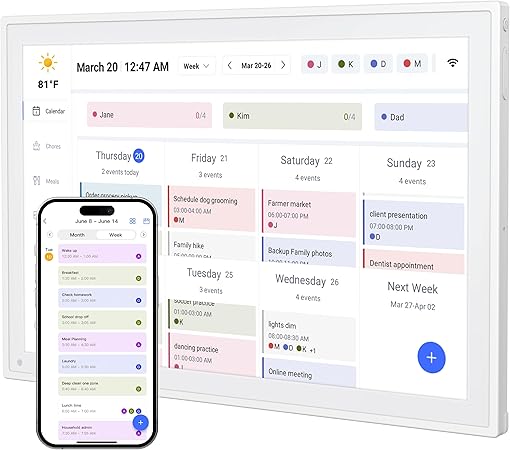
If you're looking to dip your toes into digital calendar territory without breaking the bank, the YPI calendar is an excellent starting point. Don't let the lower price fool you. This calendar packs impressive features into a more affordable package.
Making the Switch
I know change can feel overwhelming, especially when you're already managing a million things. But transitioning to a digital family calendar is actually much easier than you might think. Here's what helped me:
Week One – Set up the calendar and sync your main accounts. Don't worry about perfection. Just get the basic structure in place. Place it somewhere everyone passes by multiple times a day (kitchen is ideal).
Week Two – Start adding regular recurring events. Sports practices, work schedules, standing appointments. The beauty of digital calendars is that once you set up a recurring event, it's done forever.
Week Three – Get the family involved. Show everyone how to add their own events and check the schedule. Make it a habit to glance at it every morning during breakfast.
Month Two and Beyond – Watch as the mental load starts to lift. You'll notice fewer “I didn't know about that!” moments and more family members taking responsibility for their own schedules.
The Real Benefits I Didn't Expect
Beyond the obvious organizational benefits, digital family calendars offer some surprising advantages:
Reduced Decision Fatigue – When everyone can see what's happening, you don't have to constantly answer questions about schedules. Your brain gets a break from being the family information hub.
Better Communication – Seeing everyone's commitments creates natural opportunities for conversation about how to support each other. Like knowing your spouse has an early meeting so you'll handle the morning routine.
Teaching Responsibility – Older kids and teens can manage their own schedules, learning valuable time management skills while reducing what you need to track.
Less Guilt – When you can see everything laid out visually, it's easier to spot where you might be overcommitted and give yourself permission to say no or reschedule.
Menopausal Brain Support – Let's face it. Brain fog is real, and having a reliable external system for tracking everything means we're not relying solely on memory during a time when it might not be our strongest asset.
My Final Recommendation
If you can invest in the Skylight Calendar, do it. The quality, features, and user experience justify the price, especially when you consider how much mental energy you'll save. It's the calendar I'd choose for my own family without hesitation.
For families on a tighter budget the YPI 10-Inch Digital Calendar offers fantastic value. You'll get the core benefits of a shared digital calendar without the premium price.
And if your family lives and breathes Google Calendar, choose the option with seamless Google integration. The time you'll save by not fighting with sync issues is invaluable.
Starting Fresh This January
Here's the truth: you deserve tools that make your life easier, not harder. As midlife women, we're navigating enough challenges between hot flashes, schedule management, and trying to remember why we walked into a room. A digital family calendar won't solve everything, but it will lift some of that invisible weight we carry.
This January, give yourself and your family the gift of organization. Choose the calendar that fits your budget and needs, set it up over a weekend, and watch as your family communication improves and your mental load lightens.
You're not asking for too much by wanting a more organized life. You're simply being smart about using technology to support the incredible job you're already doing keeping everyone on track.
Here's to a more organized, less stressful 2026. One synchronized schedule at a time.
As an Amazon Prime member, I appreciate the convenience of fast, free shipping and easy returns on all these products. The links provided are affiliate links, which means I may earn a small commission if you purchase through them, at no additional cost to you.
Love to have a family digital calendar. Thanks for the recommendation.
Thanks! We love ours and it’s been such a help to our family communication and time management.
I have been interested in the Skylight for a while now. This is a lot of helpful information. Great post!
Thank you for the inspiration to finally get organized! Great recommendations for finding the best digital family calendar!
Such a helpful post! Starting the new year with a digital family calendar truly makes life feel more manageable. I love how you broke down the features of each option—it makes choosing the right one so much easier. Syncing schedules, reminders, and shared to-dos all in one place is exactly the kind of organization my family needs for a smoother year ahead. Thanks for the clear guidance and inspiration!
I love this calendar, we have been using this for a while now and definitely can’t live without it.
Digital family calendars are a game-changer for keeping everyone on the same page, especially during busy weeks. I appreciate the tips on choosing the best apps and features—it makes starting the new year organized feel much more achievable.
Ive seen that skylight calendar before and wondered about it! We currently use a google calendar since our phones are constantly attached to us and we usually have to reference it on the fly. Thanks for your thoughts about these options!